1. Installation¶
Five minutes, three edits.
1. Add the dependency¶
Causa lives at tools/causa/ under coord day8/re-frame2-causa. While re-frame2 is in alpha, use the :local/root route from a clone of the repo:
;; deps.edn — a dev alias only; Causa must NEVER appear in production deps
{:aliases
 {:dev
  {:extra-deps {day8/re-frame2-causa {:local/root "tools/causa"}}}}}
Once we publish to Clojars, the dev-deps coord will be day8/re-frame2-causa {:mvn/version "0.0.1.alpha"} (tracking the repo's VERSION file). Until then, vendor through a checkout.
2. Add the layout host¶
Causa's default launch is true inline. Add a right-side host to your
normal app layout. Note the DOM order: <main> first, host <aside>
second — flex flow puts the aside to the right of the app column:
:root { --rf-causa-accent: #7C5CFF; } /* brand-accent var (rf2-9ovfb) — host stylesheets read var(--rf-causa-accent) to tint dev chrome */
.app-shell { display: flex; min-height: 100vh; }
[data-rf-causa-host] {
  flex: 0 0 var(--rf-causa-inline-width, 560px);
  min-width: 320px;
  box-sizing: border-box;            /* the 1px border lives inside the
                                        documented width */
  border-left: 1px solid #2a2a2a;   /* visual separator on the app side */
}
#app { flex: 1; min-width: 0; }
That's the whole consumer surface — no resize: horizontal, no
overflow: auto. Causa auto-injects a polished drag handle on the
panel's outer edge as soon as the shell mounts (per rf2-70u8q +
spec/007-UX-IA.md §Resize affordance); the handle covers mouse,
touch, and pen via pointer events and is keyboard-navigable.
Two complementary resize mechanisms ship together:
- CSS variable (host-owned, fixed-point sizing). Override
--rf-causa-inline-widthanywhere up the cascade to set the initial width: - Causa drag handle (user-controlled, persisted; auto-injected).
Drag the panel's outer edge to resize. Width clamps to
[320px,
  90vw]
and persists across reloads viaconfigure! :settings :general :panel-width-px. Double-click (or press Enter / Space when focused) to reset to default. The variable seeds the initial size; a drag overrides it; both write to the sameflex-basis.
Some teams prefer the browser-native handle (resize: horizontal +
overflow: auto on the host). Causa detects that at render time via
getComputedStyle and renders no handle of its own — the consumer
wins, no double-handle.
If Causa cannot find the host, it logs an actionable console.error
and exposes the same diagnostic through
window.day8.re_frame2_causa.status().
3. Wire the preload¶
;; shadow-cljs.edn — dev build only
{:builds
 {:app
  {:devtools {:preloads [day8.re-frame2-causa.preload]}}}}
That's it. The preload registers Causa's listeners, attaches the Ctrl+Shift+C keybinding, and auto-opens into [data-rf-causa-host] once rf/init! has installed the substrate adapter. No (require '[day8.re-frame2-causa.core]). No init! call. The preload plus host element are the integration surface.
A re-frame2 dev build with that preload, reloaded, is the precondition for the rest of this tutorial.
4. Launch¶
Open your app in dev. The shell appears in the right inline host:
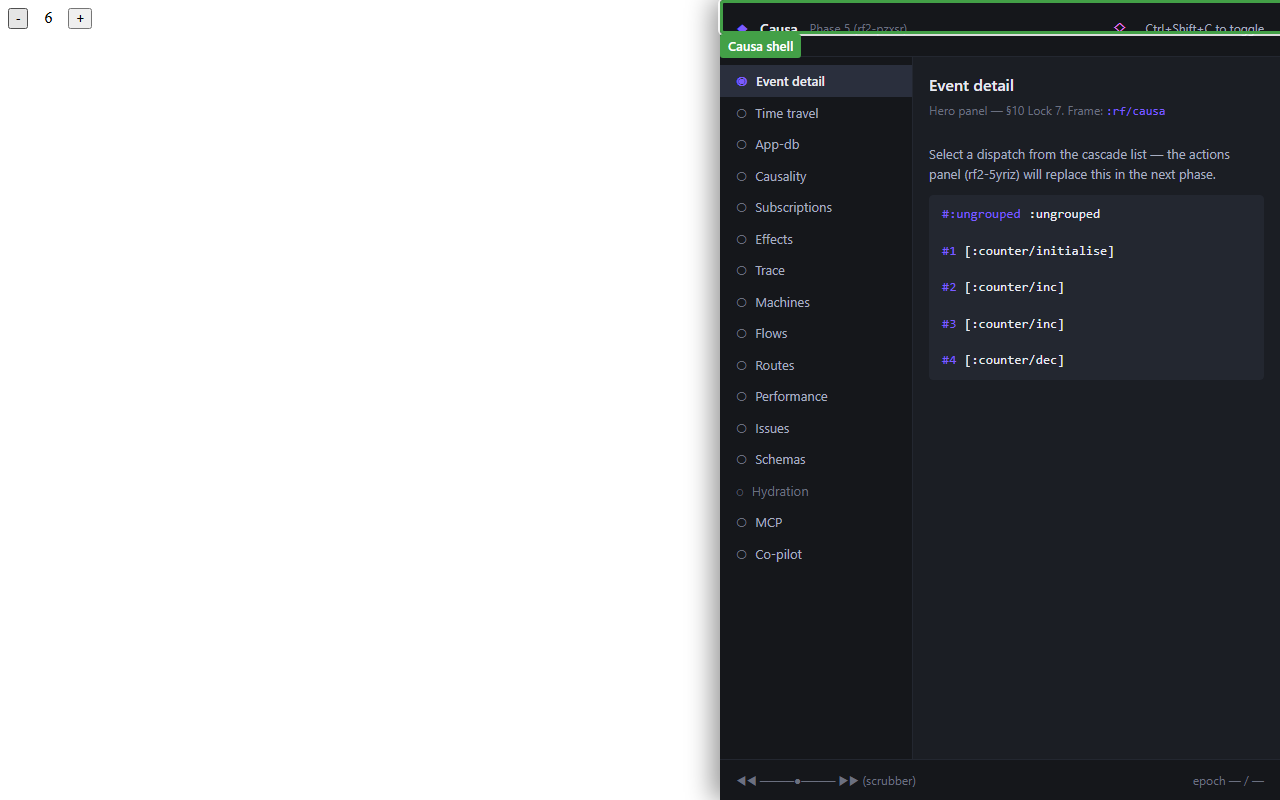
The shell is a three-region layout (inside the Causa panel itself):
- Sidebar (left): the panel list.
- Canvas (right): the selected panel.
- Bottom rail: the time-travel scrubber.
Ctrl+Shift+C now hides/shows that mounted shell without unmounting it.
Keybindings¶
The shell wires one global keybinding pre-alpha:
| Action | Keys |
|---|---|
| Open / close | Ctrl+Shift+C |
Pop-out and command-palette keys some early drafts named are not
wired today. Pop out programmatically with (causa/popout!) (or
window.day8.re_frame2_causa.popout_BANG_() from a devtools
console); reach the palette via the top-strip control once that
surface lands. The popout uses window.opener to reach the host's
runtime — same listeners, same registrar — so the popped window
shows everything the main window does. Useful when the panel is
competing with the app for screen space.
Suppressing auto-open¶
Tool-owned pages that deliberately do not reserve app real estate for Causa (for example a Story-only browser-test canvas, or an internal dev tool whose layout cannot accommodate a right column) can suppress only the default page-load open while leaving the rest of the preload — collectors, browser API, keybinding — installed:
(require '[day8.re-frame2-causa.config :as causa-config])
(causa-config/configure! {:launch/auto-open? false})
Call this before rf/init! runs. After the suppression, an
explicit (causa/open!) or (causa/toggle!) (or pressing
Ctrl+Shift+C) still mounts Causa — and still emits the normal
actionable missing-host diagnostic if [data-rf-causa-host] cannot be
found. The flag scopes the auto-open only; it does not disable
Causa.
App dev pages should keep the default true posture and provide
[data-rf-causa-host] as shown above.
Disable¶
Two ways out:
;; 1. Remove the preload entirely (recommended for prod builds)
{:builds {:app {:devtools {:preloads []}}}}

;; 2. Or keep the preload but force the shell off
{:builds {:app {:compiler-options
                {:closure-defines
                 {day8.re-frame2-causa.config/enabled? false}}}}}
Option 2 is for the rare case where you want to disable Causa in a specific dev build (say, when profiling raw render cost). Option 1 is the canonical way to keep Causa out of a release.
Production: nothing ships¶
Causa is dev-only by construction. Under :advanced compilation with goog.DEBUG=false:
- The preload entry, by Closure DCE rules, is reachable only through dev-build paths; production builds don't
:requireit. - The framework's trace bus is gated on
re-frame.interop/debug-enabled?. Withgoog.DEBUG=false, everyregister-trace-cb!registration is elided at the source. - Source-coord stamping (
data-rf2-source-coordon every rendered element) is gated on the samedebug-enabled?. The rendered HTML in a production bundle carries no source-coord bytes.
A CI gate at implementation/scripts/check-bundle-isolation.cjs greps the plain examples/counter production bundle for Causa-internal sentinel strings; any hit is a PR-failing regression. The elision holds whether you remember to remove the preload or not.
Quick sanity check¶
The counter example bundle is the smallest thing that exercises the full pipeline. Inside this repo:
cd implementation
npx shadow-cljs watch examples/counter   # dev build with Causa preloaded
npx http-server -p 8080 out/examples/counter
# then browser: http://localhost:8080
The Causa shell should appear in the right inline host as soon as the counter app loads. Click the + button a few times and the Event-detail panel should paint the cascade your clicks produced. Ctrl+Shift+C hides/shows the mounted shell. That's the smoke test.
When that works on your own app, you're ready for the panel tour.