4. Workspaces + args editor
A workspace is a layout that arranges variants on one page. Five layouts ship; two of them carry most of the workload.
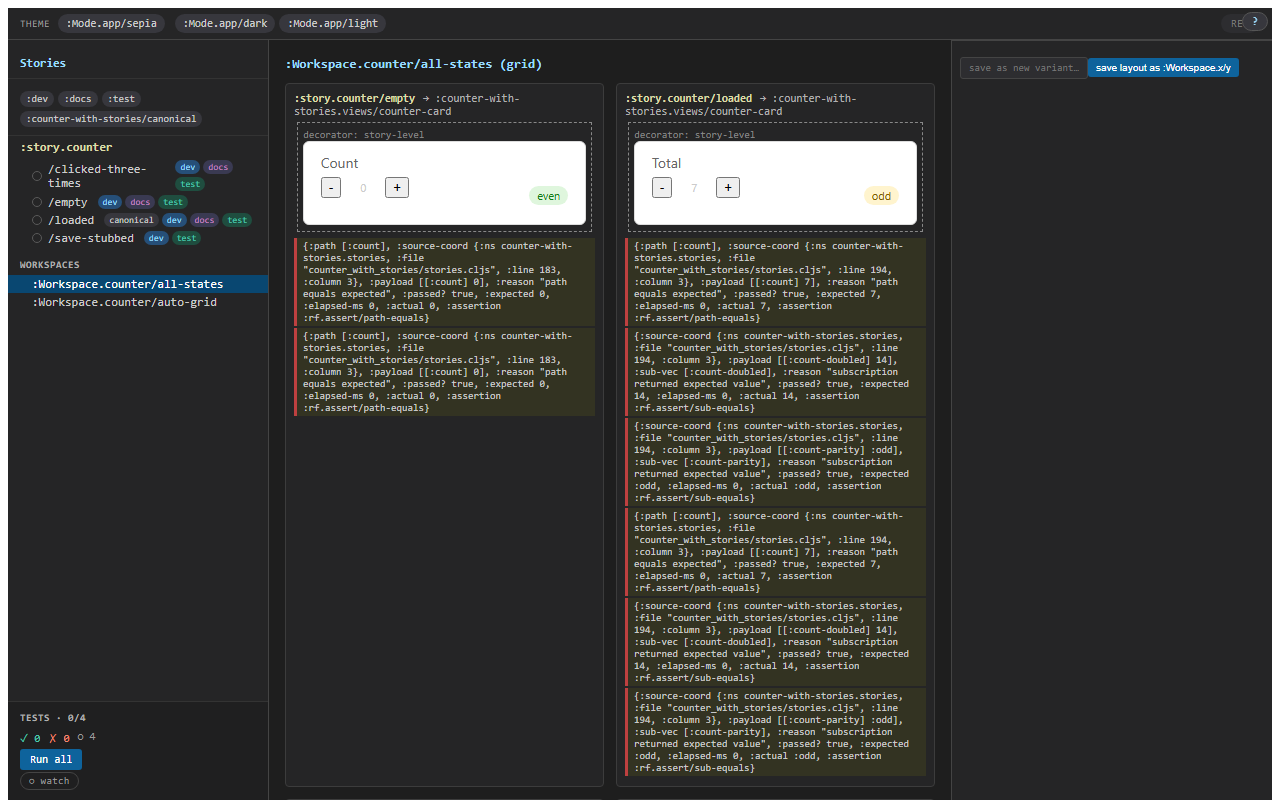
Two common shapes
:grid— explicit list of variant ids, in order, in a grid. The variant grid you reach for when a story has, say, four named states and you want a screenshot showing all of them.:variants-grid— auto-enumerated from a parent story id. New variants land here without touching the workspace.
Three less-common layouts also ship: :stack (vertical), :overlay (compare two variants in alternate-rows mode), and :custom (you pass a hiccup tree with (story/variant-cell <id>) placeholders).
Per-cell args + modes
Each variant cell in a workspace can carry per-cell overrides: args that apply only to this cell. So the same :story.counter/loaded variant can render as {:n 7} in one cell and {:n 99} in another:
(story/reg-workspace :Workspace.counter/big-numbers
  {:layout   :grid
   :columns  3
   :cells    [{:variant :story.counter/loaded :args {:n 1}}
              {:variant :story.counter/loaded :args {:n 50}}
              {:variant :story.counter/loaded :args {:n 999}}]})
The runtime allocates a separate frame per cell. Three loaded-cells = three frames, all independent. Per-cell time-travel (next chapter) is per-frame, so you can rewind one cell without affecting the other two.
Modes — saved tuples
A Mode is a Chromatic-style saved tuple of args that any variant can render against:
(story/reg-mode :Mode.app/dark
  {:args {:theme :dark :background "#1e1e1e" :foreground "#e0e0e0"}})

(story/reg-mode :Mode.app/light
  {:args {:theme :light :background "#ffffff" :foreground "#1a1a1a"}})
When a variant renders against :Mode.app/dark, the mode's :args deep-merge into the variant's effective args between the global layer and the story layer (i.e., the mode sits between global-args and story-args in the four-layer chain).
Each (variant × mode) cell has its own snapshot-identity — visual-regression services key off it. Dark mode and light mode become two screenshots from one variant body. (See chapter 5 for the snapshot-identity contract.)
The args editor
In the right-side controls panel, every resolved arg gets an editor row. The editor row is auto-derived from the registered schema (or the :argtypes fallback). Editing a value dispatches a :rf.story/cell-override event that adds a cell-local override; the canvas re-renders against the new effective args.
The editor row honours the schema's constraints. An :int {:min 0 :max 99} is a number-input clamped 0–99. An :enum [:a :b :c] is a radio group. A :map is a nested editor. A :string is a text input.
The cell-overrides are cell-local — clicking on a different variant or workspace cell discards them. To make an override stick, click save as new variant… (see chapter 3).
Sharing a workspace state
The workspace + active mode + cell-overrides are transit-shareable. The share this layout button serialises the picked state into a URL fragment; whoever opens the URL sees the same grid in the same state.
This is the v1 sharing primitive — it's what lets you paste "look at this grid" into a chat message and have the reader see exactly what you see. The URL is small; the embedding is forgiving. For the larger / off-network case, the QR-code share affordance (next chapter) does the same thing with a render-to-image step.
Workspaces are layouts, not state
A workspace doesn't hold any runtime state of its own — it's just an ordered list of (variant + per-cell args) tuples. So:
- New variant added under
:story.counter→ an:variants-gridworkspace picks it up immediately. - Workspace renamed → all the sidebar links auto-update.
- A variant deletion that leaves a workspace with a dangling reference → the cell renders a "this variant no longer exists" placeholder; the rest of the workspace renders normally.
The contract is "workspaces are layouts over variants"; everything follows from that.