2. Mode tabs
Every selected variant carries a strip of mode tabs at the top of the canvas. Three core modes — Canvas, Docs, Tests — and four orthogonal toolbars — viewport, background, a11y, locale.
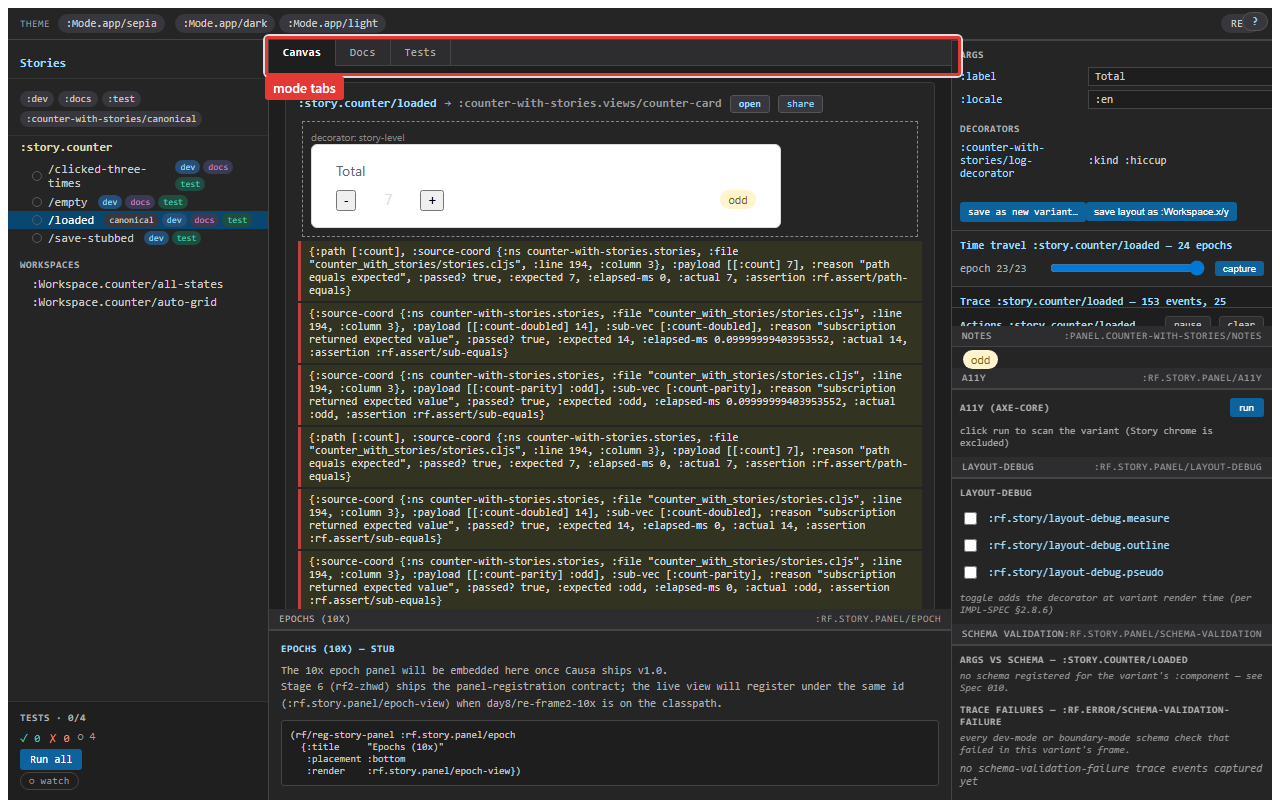
Canvas / Docs / Tests
The three core modes are mutually exclusive. The chip you click swaps the canvas content.
- Canvas — the default. The variant's component renders inside its frame; controls, decorators, the live trace strip all apply.
- Docs — an auto-generated documentation pane: the parent story's
:doc, the variant's:doc, the resolved args table, the resolved decorators table, the resolved parameters, the variant's tags. The args table reads from the three-layer args walk; the decorators table reads from the resolved decorator chain. NoMDXplumbing; the doc surface is read off the registrations.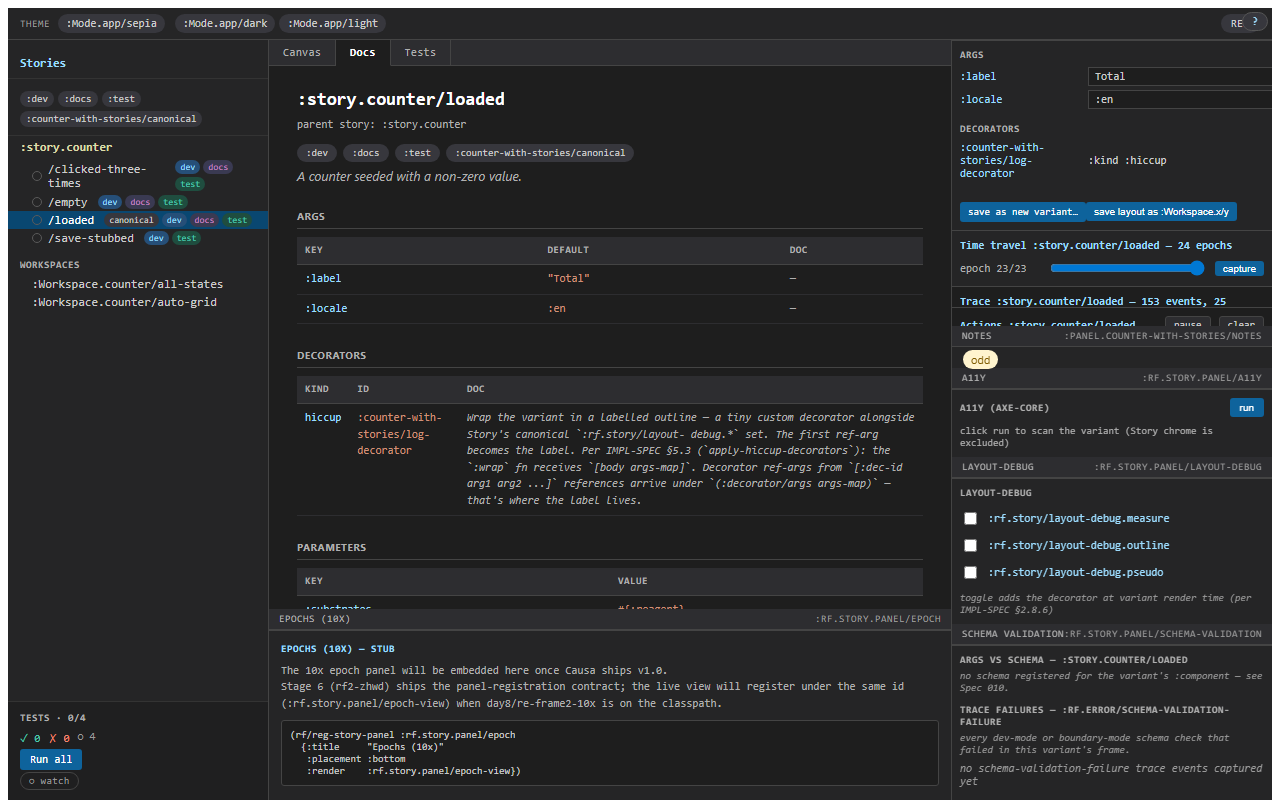
- Tests — the variant auto-runs on entry. The pane shows each
:playassertion in order, with a green/red chip and the full record (path, expected, actual). The pane is a microcosm of the chrome-level test widget: a Run-all button, a counts headline, per-assertion drill-down.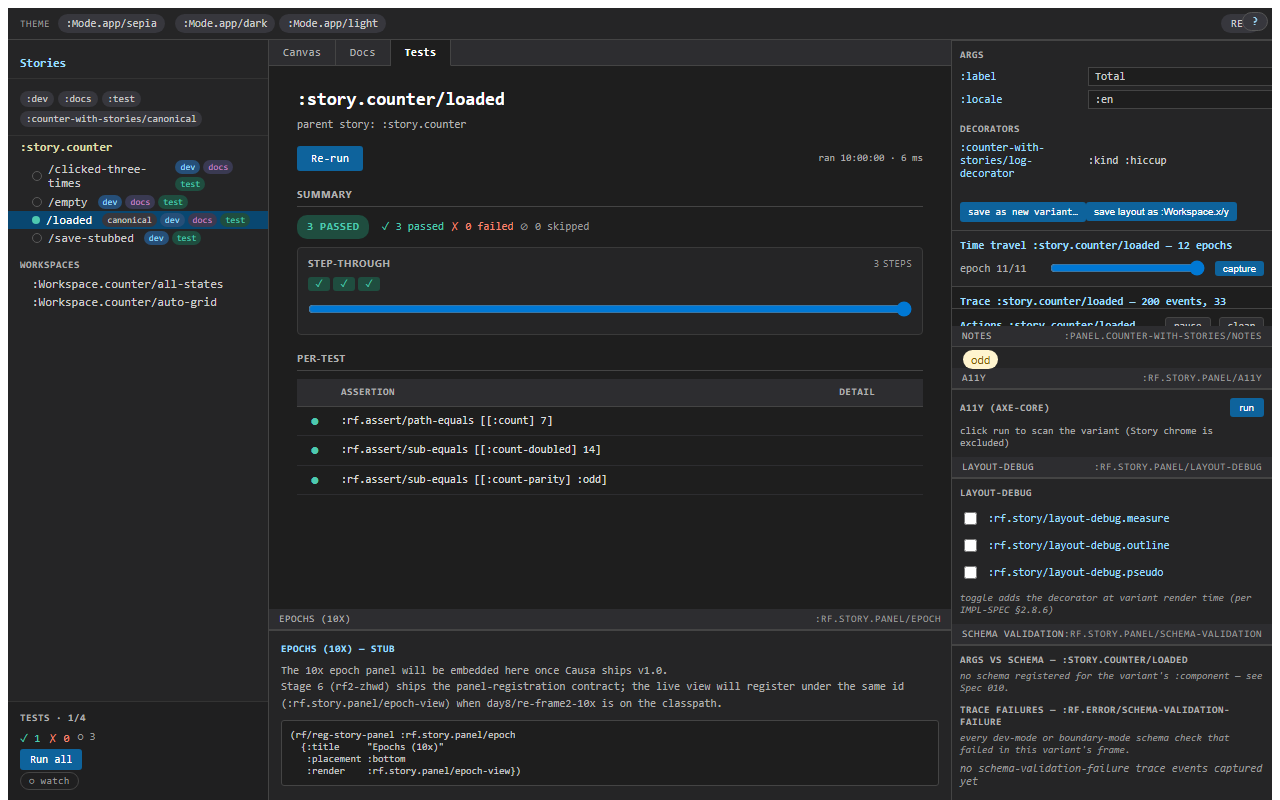
Selection is per-variant and persists across reload in localStorage under re-frame.story/active-mode-tab/<variant-id>. Open a variant where you were on Tests last time; you're on Tests again.
Viewport — responsive at the panel level
A second strip below the mode tabs picks the viewport: mobile / tablet / desktop / wide, plus a custom slot. The canvas frame's size adjusts; the rendered component sees the resized viewport. Useful for responsive design — flip three sizes side-by-side without resizing the browser window.
Viewport is independent of mode tabs — Canvas with mobile viewport, Docs with desktop viewport, etc.
Background — design context
The third strip is the background-colour picker — light, dark, checker, brand, plus custom hex. The canvas's surrounding chrome paints in the picked colour; the component renders on top. This is the chrome equivalent of opening a design tool's artboard and changing the canvas colour to compare contrast.
Background and :Mode.app/dark (the args-Mode primitive, see chapter 4) are distinct. Background paints the chrome; a dark-mode Mode passes {:theme :dark} into the component's args. You can run a :Mode.app/dark variant on a checker background to see which is the component's own dark and which is the chrome.
A11y — axe-core, opt-in
A11y is opt-in because axe-core is heavy and most variants don't need it on every render. Toggle it on per-variant via the a11y chip; the panel runs an axe pass on the rendered canvas and renders the results inline — violations in red, passes in green, manual checks in yellow.
Story 1.0 ships axe-core vendored locally — there's no CDN hit, no network roundtrip. The companion bead rf2-20w5i tracked the vendor-and-opt-in switch; the upshot is a11y is now a tab away with zero install. (Production builds DCE the entire axe-core path; the prod bundle carries no a11y bytes.)
Locale
The locale strip cycles through any locales the parent story declares — :en-AU, :fr-FR, :ja-JP, etc. The canvas re-renders with the locale set as a cofx; views that read (rf/locale) swap their strings.
Story doesn't ship a translation engine — the parent story just declares which locales are interesting, and the runtime takes it from there. If your app uses formatjs or tongue or any other i18n surface, point it at the locale strip's selection.
What "orthogonal" means
The four toolbars compose: viewport × background × a11y × locale. Mobile, dark chrome, a11y-on, ja-JP is a coherent picked state. The Story shell encodes that picked state into the URL fragment so reload preserves it; the share button (see chapter 5) serialises it for paste-into-issue.
The mode tabs sit on top: each picked toolbars-state has its own Canvas / Docs / Tests views. So Tests mode with mobile viewport is "run the play assertions against a 375-wide canvas." The shell does this for you; you just click the chips.
When you wouldn't use mode tabs
Some variants are deliberately Canvas-only — design references, sample compositions, pinned screenshots. Tag the variant :canvas-only and the Docs/Tests chips are disabled (with an explanatory tooltip). The :test-runner skips them; the :docs export skips them.
Tag inverts: :test-tagged variants always run in Tests mode at least once per session, even if you stay on Canvas in the UI. The chrome's test widget aggregates the run; the widget headline is "Tests · 3/5" with chips for ✓ ✗ ○ (passed / failed / un-run).
Next: the recorder + Test Codegen — the hero feature.