Record an interaction
Use the recorder to turn canvas interaction into a script, then edit it into a repeatable test. A recording supplies actions; add assertions for the behaviour you want to preserve.
Recording a script
Give the login form a starting variant whose HTTP effect cannot leave the test:
;; In the testbed namespace, which requires [re-frame.story :as rf.story].
(rf.story/reg-variant :story.login-form/recording-start
  {:extends :story.login-form/idle
   :decorators [[rf.story/force-fx-stub-id :rf.http/managed {}]]
   :tags #{:dev :test}})
- Select
recording-startand press REC in the toolbar. - Keep DOM on to record browser gestures. Type
ada@example.comandwrong, then press Sign in. - Press REC again, or stop in the overlay.
- Inspect the generated form in Test Codegen.
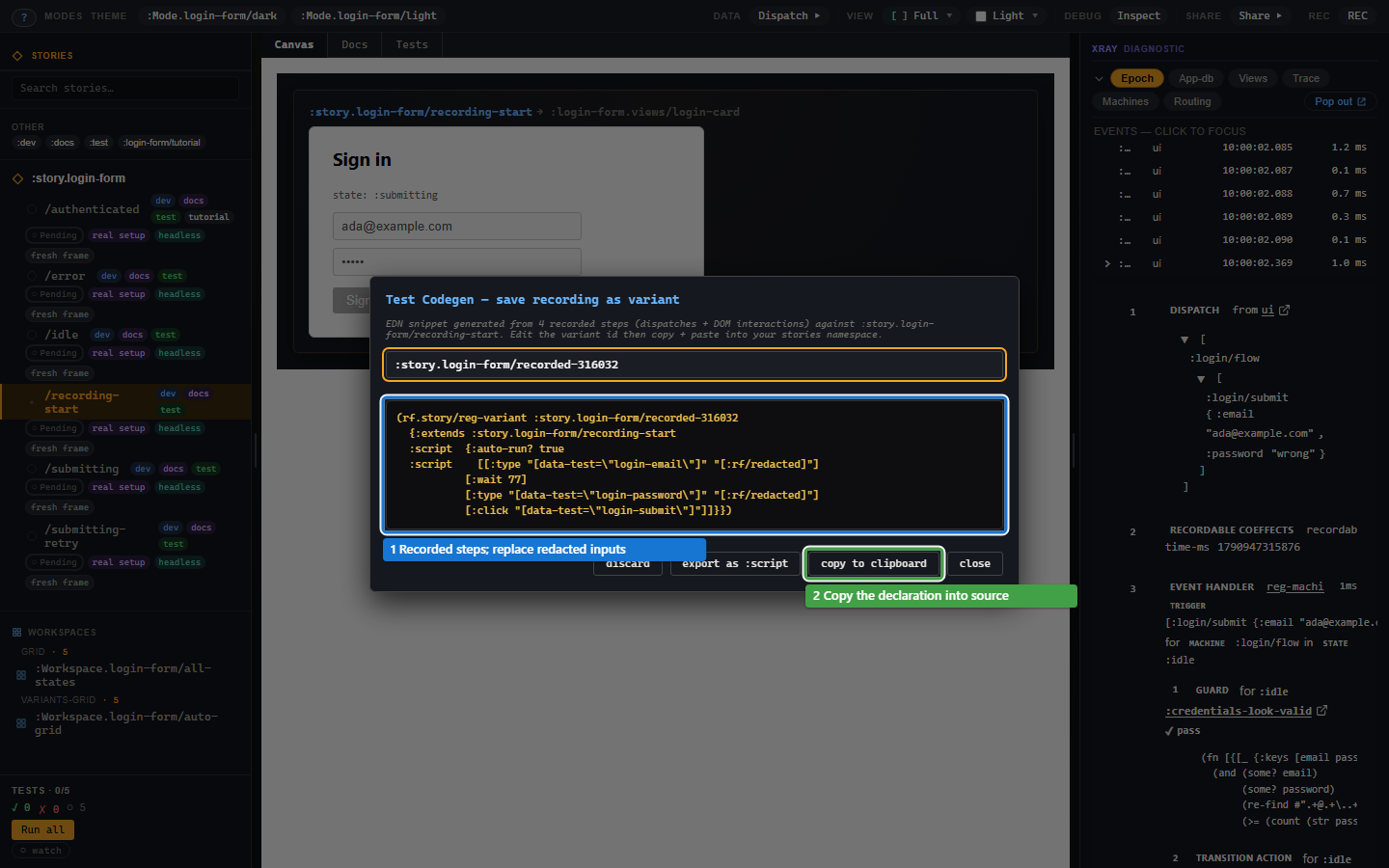
Email and password fields are redacted. The recorded form therefore needs edited test inputs before it can replay meaningfully. Keep synthetic values, remove incidental pauses and add a useful expectation:
(rf.story/reg-variant :story.login-form/submit-from-form
  {:extends :story.login-form/recording-start
   :script [[:type "[data-test=login-email]" "ada@example.com"]
            [:type "[data-test=login-password]" "wrong"]
            [:click "[data-test=login-submit]"]
            [:assert [:rf.assert/state-is :login/flow :submitting]]
            [:assert [:rf.assert/effect-emitted :rf.http/managed]]]
   :tags #{:dev :test}})
Open Tests on this variant. Expect the form to show Signing in and both assertions to pass. The stub holds the request, so the test checks submission and effect emission without pretending that a server accepted the login.
DOM gestures replay the events the view dispatches. The recorder omits those dispatches as separate steps to avoid doing the same action twice. DOM off records dispatched events instead, which is useful when the claim belongs in a headless state test.
What belongs in setup and script?
Setup establishes the state the viewer should land on. Script is the behaviour to observe or test. A rejected-login display uses submit and failure as setup. A rejection-interaction test puts them in its script:
(rf.story/reg-variant :story.login-form/rejection-interaction
  {:extends :story.login-form/recording-start
   :script [[:dispatch [:login/flow
                        [:login/submit {:email "ada@example.com"
                                        :password "wrong"}]]]
            [:assert [:rf.assert/state-is :login/flow :submitting]]
            [:dispatch [:login/flow [:login/failure
                                     {:status :error
                                      :error  {:kind        :rf.http/http-4xx
                                               :http-status 401
                                               :message     "Invalid credentials."}}]]]
            [:assert [:rf.assert/state-is :login/flow :error]]]
   :tags #{:dev :test}})
This second version tests the real event path without depending on DOM selectors. Both examples control the outside world and declare what they expect.
The shapes of script
:script accepts a vector of steps or a map with :script, an optional
:name and :auto-run?. A bare vector auto-runs. Setting
:auto-run? false leaves the play manual; the normal test verbs skip it.
Use :plays for several named scripts instead of :script.
The script reference gives exact
forms and selection rules.
The steps
Dispatch, assertion and DOM steps are enough for most scenarios. Dispatch
steps settle before the next step. Setup accepts only dispatches; checkpoints,
DOM gestures and waits belong in the script. A known step with malformed
arguments raises :rf.error/story-bad-step.
The recorder can insert checkpoints with + assert. export as :script offers a replay preview and optional final app-db checks. Review generated checks: an incidental state change is not necessarily behaviour worth testing. The reference lists every step.
Waiting without flakiness
Use [:wait-until [:queue-empty]] or a declared db condition rather than
a fixed pause. The runner checks it after the preceding dispatch settles;
an unmet condition fails the step rather than waiting indefinitely.
A machine state is in runtime state, so check it with state-is, not an
app-db wait.
run and is honour fixed :wait steps, but deterministic replay
checks report them as :cannot-run. Remove recorder pauses that are not
part of the interaction's meaning.
Cannot-run
The DOM script needs a browser document. A headless run reports
:cannot-run for its DOM steps, and is treats that as an unsuccessful
test. It does not mean the login code failed. The
runner guide shows how to choose a host that can perform
the step and distinguish missing capability from a failed expectation.
Runner capability ladder
Story's runner ids are :headless, :hiccup, :cljs-reactive,
:dom and :browser. Their capabilities are enumerated in
the runtime reference.
Privacy at the recorder boundary
The recorder replaces text from password, email and tel inputs, and
credential/payment autocomplete fields, with "[:rf/redacted]".
Sensitive events are removed from generated scripts. Matching typed strings
are also redacted from retained event payloads. Replace redacted values with
synthetic inputs when building a replay; classification does not manufacture
usable credentials.
Troubleshooting
| Symptom | Cause | Fix |
|---|---|---|
| Replayed form never submits | Redacted email/password are not valid test inputs | Replace them with the synthetic values shown above. |
Headless run says :cannot-run |
Recorded steps need a DOM | Run them in the browser, or keep an event-based version of the test. |
Setup raises :rf.error/story-assert-in-setup |
An assertion was placed before the script | Move it to :script or terminal :assertions. |
Setup raises :rf.error/story-setup-step-unrunnable |
It contains a wait or DOM gesture | Use a setup event; put the gesture in the script. |
| A selector matches no element | The component or selector changed | Inspect the canvas and update the selector; prefer stable data attributes. |
| The recording disappears after reload | Only the live shell held it | Copy the reviewed registration into source. |