Skip to content

8. Snapshot identity and sharing

You want to send a useful state to someone else, and you want visual-regression keys that do not explode every time you rename a variant. This chapter covers Story's content identity, a recipe for local visual review, and the Share dialog. The theme is the same as the rest of Story: share the artifact, but say honestly what the recipient can reproduce.

Content identity

A variant has a name, but names are not stable enough for every job. You can rename :story.login/error to :story.auth/login-error without changing the state it renders. You can also keep the name and change the state completely.

Story therefore computes identity over canonical content, not just the keyword.

The important hashes are:

Hash Answers
plan hash Is this the same normalized plan?
run hash Did this run behave the same way?
snapshot identity What should a visual-regression capture key use?

This is what lets a visual tool distinguish a rename from a real state change. Story does not need to be the pixel-diff service. It needs to hand the pixel service a stable, meaningful key.

Local visual review

The pixel service can be one you already have. This recipe reviews Story's variants with Playwright's toHaveScreenshot, run against your dev server. It is local, not CI: run it before you push, or after a change you want to see. The baselines live outside the repository.

The cases are your :test-tagged variants, each under every mode registered on the :theme axis. The sample reads both from the running page, so a new variant joins the review without an edit. Each case is keyed by snapshot identity, the variant id and its theme, plus the viewport and browser of the capture: the error state in dark mode is story-login-form-error--dark--1280x800--chromium. The capture is the variant's own subtree, so Story's chrome never enters a baseline. The content hash is not part of the key; it is recorded beside each baseline, so a review can tell you whether a diff arrived with a declared change or without one. Snapshot identity also covers the render inputs a variant receives from a fragment it composes or from an ancestor it inherits through :extends; the :fx-overrides and :interceptor-overrides a run installs for it, whether they sit on its own body or on one of those; and the behaviour :images it or its story declares, though not an ancestor's, which never reach the variants that extend it. Editing a shared fragment, a parent's seed, setup, network stubs or decorators, pointing an effect override at a different handler or an interceptor override at a different interceptor, or selecting a different behaviour image therefore moves the hash of every variant the edit reaches, and the first review after this change reports those variants' hashes as moved even where their pixels match. A moved hash on its own fails no case and asks for no new baseline: baselines are keyed by variant, and only a pixel change needs your approval.

Put two files in a story-visual/ directory in your app.

1. story-visual/playwright.config.cjs sends baselines and diff images to the directory named by STORY_VISUAL_DIR, and refuses to run without one:

const path = require('path');

// Baselines and diff images go to a directory OUTSIDE the repository.
const dir = process.env.STORY_VISUAL_DIR;
if (!dir) throw new Error('Set STORY_VISUAL_DIR to a directory outside the repository.');

module.exports = {
  testDir: __dirname,
  testMatch: 'visual-review.pw.cjs',
  snapshotPathTemplate: path.resolve(dir, 'baselines', '{arg}{ext}'),
  outputDir: path.resolve(dir, 'results'),
  updateSnapshots: 'none', // a plain run never writes a baseline; only -u does
  workers: 1,
  timeout: 5 * 60 * 1000, // one test walks every case
  expect: {
    timeout: 30 * 1000,
    toHaveScreenshot: { threshold: 0 }, // the 0.2 default passed a real colour change
  },
  use: { browserName: 'chromium', viewport: { width: 1280, height: 800 } },
};

2. story-visual/visual-review.pw.cjs walks the cases:

const fs = require('fs');
const path = require('path');
const { test, expect } = require('@playwright/test');

const BASE = process.env.STORY_URL || 'http://localhost:8043/';

test('visual review of the :test-tagged variants', async ({ page, browserName }) => {
  // Keep Story's first-visit help overlay off every capture.
  await page.addInitScript(() => localStorage.setItem('re-frame.story/seen-help-v1', '1'));
  await page.goto(`${BASE}#/stories`);
  await page.waitForFunction(() => window.re_frame?.story?.registrations
    && cljs.core.count(re_frame.story.registrations(cljs.core.keyword('variant'))) > 0);

  // Ask the running page, through the dev build's globals, for the cases.
  const { variants, themes } = await page.evaluate(() => {
    const story = re_frame.story;
    const kw = cljs.core.keyword;
    const ids = (ks) => Array.from(cljs.core.to_array(ks)).map((k) => k.fqn).sort();
    const themeModes = Array.from(cljs.core.to_array(story.registrations(kw('mode'))))
      .filter((e) => cljs.core.get(cljs.core.val(e), kw('axis'))?.fqn === 'theme');
    return {
      variants: ids(story.variants_with_tags(cljs.core.vector(kw('test')))),
      themes: ids(themeModes.map((e) => cljs.core.key(e))),
    };
  });
  expect(variants.length, 'no :test-tagged variants to review').toBeGreaterThan(0);

  const { width, height } = page.viewportSize();
  const approving = ['all', 'changed'].includes(test.info().config.updateSnapshots);
  for (const variant of variants) {
    for (const theme of themes.length ? themes : [null]) {
      // The case key: variant id, theme, viewport and browser.
      const name = [variant, theme ? theme.split('/').pop() : 'no-theme', `${width}x${height}`, browserName]
        .join('--').replace(/[^a-zA-Z0-9-]+/g, '-'); // the spelling Playwright writes to disk
      const query = new URLSearchParams(theme ? { variant, modes: theme } : { variant });
      await page.goto(`${BASE}?${query}#/stories`);

      // Settle on the variant's run reaching its verdict, not on a sleep. A run
      // settles whether or not the variant has a play that runs on its own.
      const canvas = page.locator(`section[data-test-variant=":${variant}"]`);
      await expect(canvas).toHaveAttribute('data-run-status', /^(pass|fail|cannot-run|error)$/);
      await expect(canvas).toHaveAttribute('data-snapshot-hash', /^[0-9a-f]+$/);
      const hash = await canvas.getAttribute('data-snapshot-hash');

      // Capture and compare EVERY case on every run, whatever the hash says.
      const errorsBefore = test.info().errors.length;
      await expect.soft(page.locator(`[data-rf-story-variant-root=":${variant}"]`))
        .toHaveScreenshot(`${name}.png`);
      const pixels = test.info().errors.length > errorsBefore ? 'DIFFER' : 'match';

      // The content hash is provenance: recorded on approval, reported on review.
      const sidecar = test.info().snapshotPath(`${name}.hash.json`);
      if (approving) {
        fs.mkdirSync(path.dirname(sidecar), { recursive: true });
        fs.writeFileSync(sidecar, JSON.stringify({ hash }));
        console.log(`${name}: approved at hash ${hash}`);
      } else {
        const approved = fs.existsSync(sidecar) ? JSON.parse(fs.readFileSync(sidecar, 'utf8')).hash : null;
        console.log(`${name}: pixels ${pixels}, hash ${hash === approved ? 'unchanged' : `moved from ${approved}`}`);
      }
    }
  }
});

STORY_URL points it at your dev server's page; the default is the login-form testbed from chapter 1.

With @playwright/test installed (npm install --save-dev @playwright/test, then npx playwright install chromium) and your dev server running, approve the first baselines from your app's root:

STORY_VISUAL_DIR=../my-app-visual npx playwright test -c story-visual/playwright.config.cjs -u

After that, review with the same command and no -u:

STORY_VISUAL_DIR=../my-app-visual npx playwright test -c story-visual/playwright.config.cjs

Each case prints a line such as story-login-form-error--dark--1280x800--chromium: pixels match, hash unchanged. A case whose pixels differ fails the run, and Playwright writes the expected, actual and diff images under ../my-app-visual/results. When the diff is the change you meant, run the command with -u again to approve it.

Three rules came out of the experiment behind this recipe, and the sample keeps all three:

  • Never skip a capture because the content hash is unchanged. The hash covers declarations, not CSS, fonts or the view's implementation. A CSS-only change differed on all ten cases while every hash stayed the same, so the sample captures and compares every case on every run, and the hash only reports.
  • Pin threshold: 0. Playwright's default per-pixel tolerance of 0.2 passed a real heading-colour change as clean on all ten cases. At 0 the same change differed on all ten, and 130 unchanged comparisons still differed on none.
  • Approve new baselines only with -u. updateSnapshots: 'none' stops a plain run from quietly writing a missing baseline, so every baseline, and the hash beside it, is one you approved.

No gate runs this sample, so if Story changes one of the things it leans on, nothing turns red until you run it. It depends on:

  • the dev build's JavaScript globals for re-frame.story (registrations and variants-with-tags), so it needs a watch build, not the :advanced static build;
  • Story's DOM test hooks: the canvas's data-test-variant, data-snapshot-hash and data-run-status, which carries the verdict of the variant's run once it settles, whether or not the variant has a play that runs on its own; and data-rf-story-variant-root on the variant's subtree;
  • the share URL's variant and modes parameters;
  • the help overlay's re-frame.story/seen-help-v1 localStorage key.

Sharing

The Share dialog exposes the common handoff paths.
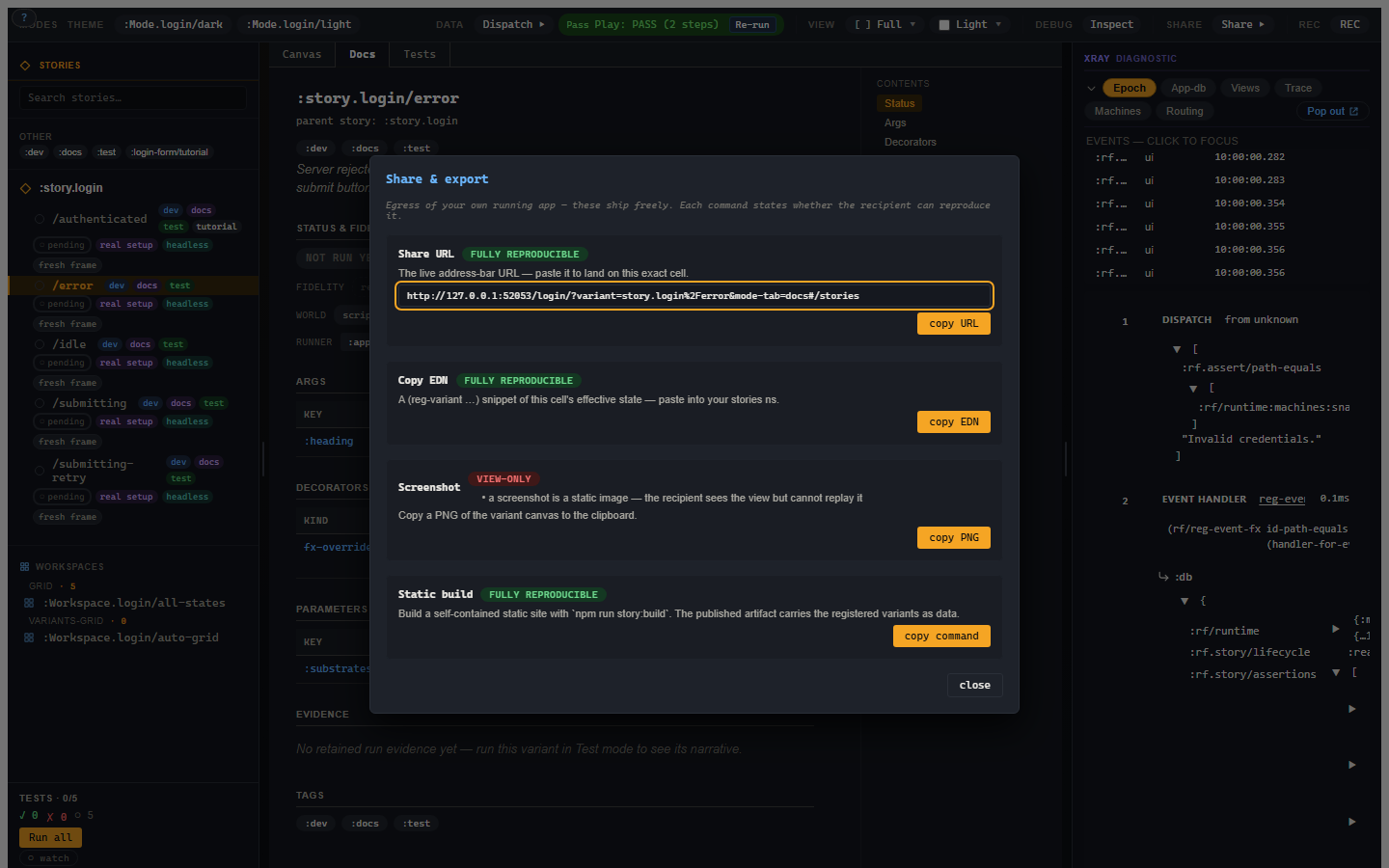
The Story Share dialog with URL, EDN, screenshot, and static build options.

The commands are:

Command What it gives
Share URL The current Story URL, including selected variant/workspace and mode state.
Copy EDN A reg-variant-shaped snippet for the selected state.
Screenshot A PNG of the canvas.
Static build The command for producing a standalone Story site.

The browser address bar is already meaningful. Selecting the error state in the login-form testbed from chapter 1, where it is registered as :story.login-form/error, produces a URL like:

http://localhost:8043/?variant=story.login-form%2Ferror#/stories

That is a small thing, but small things matter. If a tool has a stateful UI and the URL is useless, it is making you do filing work in your head.

Reproducibility labels

Each share path states how reproducible it is:

Label Meaning
Fully reproducible The recipient can land on the same state.
Partially reproducible Some state carries, but something is omitted or approximate.
View-only The artifact shows the state but cannot replay it.

A screenshot is view-only. That is not a moral failure; it is a static image. The useful part is that the UI says so.

Copy EDN can be fully reproducible when the current state can be expressed as a variant body. If live controls, transient frame state, or non-serializable values cannot be represented, the save/share path should warn rather than inventing a variant that only sort of means what you saw.

Save current versus promote

This is worth repeating because it prevents two workflows from collapsing into one button.

Save current state as variant is for authored examples. You have a useful state in the canvas and want to name it.

Promote run to regression variant is for evidence. A run failed or found an interesting case and you want to keep it as a curated regression.

Both end with a variant. They start from different places and carry different provenance. Keeping them separate makes the source history easier to trust.

Copy EDN, Save current state as variant and Promote run to regression variant each emit a whole rf.story/reg-variant form that pastes and runs as-is in a stories namespace that requires [re-frame.story :as rf.story], as the my-app.stories namespace from chapter 1 does.

Static builds

A static build packages your registered Story catalogue into a directory of plain files you can publish anywhere. Use it for design review, documentation previews, or artifact hosting where the reviewer should not need your dev server.

Static export is still Story, not a screenshot album. Variants remain registered data, with docs, controls, and status presentation.

It takes an entry namespace, a build, a host page, and one script. The names below continue the my-app from the install page.

1. An entry namespace that mounts only the shell. Your dev entry point mounts Story on the #/stories route beside your app. A published catalogue has no app beside it, so it gets its own entry, src/my_app/story_static.cljs:

(ns my-app.story-static
  (:require [re-frame.core :as rf]
            [re-frame.story :as rf.story]
            [re-frame.adapter.reagent :as reagent-adapter]
            [my-app.stories]))

(defn run []
  (rf/init! reagent-adapter/adapter)
  (rf.story/mount-shell! (js/document.getElementById "app")))

2. A build for it, beside your app's build in shadow-cljs.edn:

:story-static/my-app
{:target           :browser
 :output-dir       "out/story-static/my-app"
 :asset-path       "."
 :compiler-options {:closure-defines {re-frame.story.config/static-mode? true}}
 :modules          {:main {:init-fn my-app.story-static/run}}}

A release already drops shadow-cljs's dev-server connection. The static-mode? define drops Story's own dev-time behaviour: the shell stops polling for new registrations and does not pop the first-visit help overlay at your readers. :asset-path "." keeps the bundle's references relative, so the site works under any URL prefix.

3. A host page, resources/story-static.html:

<!doctype html>
<html lang="en">
<head>
  <meta charset="utf-8">
  <meta name="viewport" content="width=device-width, initial-scale=1">
  <title>my-app stories</title>
  <style>html, body, #app { height: 100%; margin: 0; }</style>
</head>
<body>
  <div id="app"></div>
  <script src="main.js"></script>
</body>
</html>

4. A script in package.json that releases the build and puts the host page beside the bundle as index.html:

"story:build": "shadow-cljs release story-static/my-app && node -e \"require('fs').copyFileSync('resources/story-static.html', 'out/story-static/my-app/index.html')\""

The copy is spelled in Node so the same line runs under Windows cmd and a POSIX shell. npm run story:build is also the command the Share dialog's Static build row copies.

Run npm run story:build. After the :advanced compile, which takes a minute or so, out/story-static/my-app/ holds index.html, main.js, and shadow-cljs's manifest.edn. That directory is the site: open its index.html straight from disk, serve it with any static file server, or publish the directory as-is to GitHub Pages, Netlify, S3, or any other static host. The generator template's .gitignore already ignores out/.

A variant selected in the published catalogue still writes itself into the address bar, so a link copied from the static site opens on that variant. What the site leaves out is everything that only makes sense beside a live compiler: hot reload, the registration poll, the first-visit overlay, and open-in-editor, because a published bundle must not carry a path from the machine that built it. The full account of what is bundled and what is stripped is 013-Static-Build.md.

Privacy boundaries

There are two different questions people often blend:

  • Can this artifact reproduce the state?
  • Should this value leave the machine?

The Share dialog answers the first question. The MCP and logging boundaries answer the second. Story core operates on real values inside your dev process; wire-facing tools such as Story-MCP apply redaction/elision when values cross the agent boundary.

The share URL, copied EDN, static build, and screenshot ARE re-frame2-created artifacts — which the framework's egress policy scopes in. They ship unredacted: a human pressing share / copy / export is the trusted-local operator revealing their own frame (the same intent as the framework's :rf.egress/local-raw boundary), of an app they already have full access to. A recipient of a shared artifact sees what the operator chose to share, exactly as when pasting console output. Redaction lives at the off-box boundaries (MCP / logs), not on this human egress UX.

This keeps local developer tooling useful without pretending a screenshot or URL is a security boundary.