Skip to content

Xray

The cascade you can see.

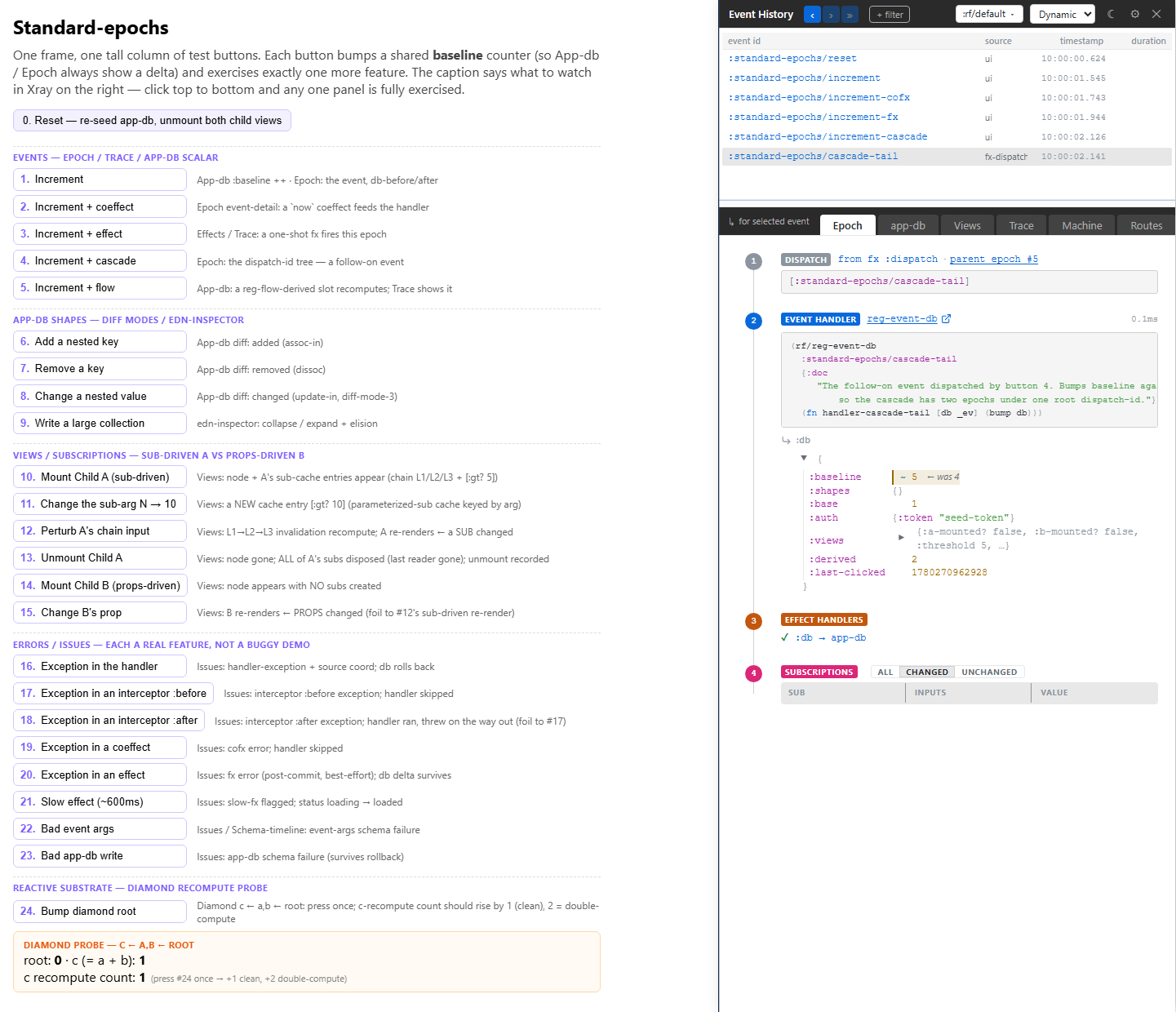
Xray is the in-app devtools panel for re-frame2. It auto-opens in a right-side [data-rf-xray-host] layout column in your dev build, toggles with Ctrl+Shift+C, and renders one of two chromes over a single observation surface — the framework's own trace bus and epoch buffer. No bespoke recorder, no shadow runtime, no second substrate. The runtime knows what happened; Xray is what knows it.

Where the v1-era re-frame-10x was a sidecar with its own recorder, Xray is a renderer of an already-structured surface. Same diagnostics — events, subs, renders, fxs, app-db diff, machines, routes — different substrate. The framework moved the observation contract into the runtime; Xray moved with it.

The chrome is two modes, one toggle (Cmd-Shift-M):

  • Dynamic — the event-coupled spine. Four stacked layers: an L1 ribbon of scope controls, the L2 event list (the timeline), an L3 strip of eight tabs, and the L4 detail panel. You pick one event in L2; every tab rebinds to that one focal point. This is where you live when you're chasing what just happened.
  • Static — the registry browser. Three layers (no L2 spine, because Static is event-independent): the same L1 ribbon, an L3 strip of five tabs, and the L4 detail panel. This is where you browse what is registered — machines, routes, schemas, flows, interceptors — without a running cascade.

The §Dynamic vs Static section below unpacks the split. If you want a single sentence to take away first: the runtime emits trace events, Xray renders them; everything else is composition.


A scenario, before the tour

You're investigating a page with the same app mounted in two frames — an :above panel and a :below panel. The two frames are meant to be fully isolated reactive contexts: counters move independently, clocks tick on independent cadences, an HTTP-loaded title in :above should never disturb the same title slot in :below. A teammate asks: the two frames look out of sync after I click Refresh in only one — is that the design, or did state leak?

The legacy debugging loop is the one you know: open browser DevTools, log console.dir(state) from two places, refresh, try to reproduce, watch the call stack scroll past. Maybe you sprinkle printlns. Maybe you give up and ask the teammate to re-run with the React profiler open.

The Xray loop is different. You haven't opened Xray yet. You're just looking at the page.

  1. You right-click the title text in :below and Copy element. The HTML reads:
    <span data-rf2-source-coord="parallel-frames.core:title-view:198:4">No title yet…</span>
    
  2. The data-rf2-source-coord attribute is on every rendered DOM element in dev mode. Four segments, colon-separated: <ns>:<sym>:<line>:<col>. You're already at the line in your editor.
  3. You read the function. It subscribes to ::title-status and ::title-text. You open the running app, press Ctrl+Shift+C, click the L1 frame picker, switch from :above to :below. The View tab now scopes every sub-recompute to the :below frame.
  4. You click Refresh in :above only. The frame picker is still on :below. The Trace tab is empty for :below — no :title/flow transition, no HTTP-shaped row, no sub recompute. Flip the picker back to :above: a single :title/flow machine-transition row, one in-flight HTTP row, and the title-status sub recomputing on a single frame. Frames are isolated. The design holds.
  5. The Machines tab confirms it from the other direction: [:rf/machines :title/flow] reads :loading under :above and :idle under :below. Two machines, two app-dbs, one source.

This is the loop the rest of the tutorial unpacks. Source coords on the wire. Frame-scoped panels. Trace bus carrying every fx and sub-run, scoped per frame. Sub-graph navigation in the panel. Epoch history you can scrub. Hot-reload with the diff preserved. None of it is novel by itself; what's novel is that they're on one substrate and the tool just paints.

Run the scenario yourself

The five-step walk-through above is a runnable testbed at tools/xray/testbeds/parallel_frames/. Clone the repo, run npm run test:examples from implementation/, then open http://127.0.0.1:8030/parallel-frames/. Click + three times in :above, then open Xray (Ctrl+Shift+C) and use the L1 frame picker to scope every panel between :above and :below. Click Refresh in :below only and watch the :title/flow machine drive :idle → :loading → :loaded under :below while :above's machine stays put. Chapter 5 (click-to-source) walks the source-coord gesture end-to-end on the same testbed; Chapter 9 (App-DB diff) reads the per-frame diffs that fall out as the user interacts.

The chapters:


Dynamic vs Static: two chromes, one surface

Xray is one tool with two reading postures. The same trace bus and the same registries feed both; what changes is whether the surface is coupled to a cascade or browsing the registry cold. Flip between them with Cmd-Shift-M; the mode pill at ribbon-left shows which you're in, and the chrome silhouette tells you at a glance even if you don't look at the pill — Dynamic has the L2 event list, Static does not.

Dynamic Static
Question "What just happened?" "What is registered?"
Coupled to one focused event (the spine sub :rf.xray/focus) nothing — event-independent
Layers 4 (L1 ribbon · L2 event list · L3 tabs · L4 detail) 3 (L1 ribbon · L3 tabs · L4 detail — no spine)
Tabs 7: Event · App DB · View · Trace · Machines · Routing · Issues 5: Machines · Routes · Schemas · Flows · Interceptors
Edge stripe violet cyan
Motion LIVE pulse + tab fade dampened — pulses off, instant tab swaps

Dynamic is the load-bearing mode. Four layers stack top-to-bottom:

  • L1 — ribbon. Scope controls: the nav cluster (◀ ▶ ⏭ — back / forward / snap-to-head), the frame picker, the IN/OUT filter pills, and the right-icons (settings , close ).
  • L2 — event list. The spine. Single-line rows, latest-on-bottom, eight visible by default and user-resizable. This is the timeline — clicking a row focuses it (flips to RETRO) and rebinds every tab below; pressing snaps focus back to the live head. Time-travel is reached here, not on a bottom rail (see chapter 3).
  • L3 — tab bar. Seven tabs, each a lens on the one focused event. Mnemonic letters: Event e · App DB a · View v · Trace t · Machines m · Routing r · Issues i. Count badges (View 8, Trace 47) update as focus moves.
  • L4 — detail panel. The active tab's projection of the focused event, filling the remaining canvas.

Static is Xray-in-a-quieter-key. It drops the L2 spine — there is no "focused event" to couple to — and renders the same ribbon and tab-bar over five registry-browse tabs: Machines (default), Routes, Schemas, Flows, Interceptors. Use it to answer "what machines exist and what do they look like?", "which routes are registered and how do they rank?", "what schemas guard which slots?" — questions about the shape of the app, not a particular cascade.

The two modes keep separate tab selections, so flipping back and forth never clobbers where you were.


The architectural punchline: one observation surface

The thing to internalise before opening Xray: the framework commits to a single observation surface, and every tool consumes it.

Trace stream. Epoch records. Registrar queries. Source-coord indices. Static topology. That's the surface. There is no privileged tool — every consumer registers as a peer listener on the trace bus, each with its own id, each filtering the stream as it likes. Your in-app debug panel attaches the same way Xray does, in the same call, with the same shape of data arriving. A future tool nobody's built yet — a story-tool panel, an AI-driven test-generator, a conformance recorder for fixture capture — does too.

This is what first-class tooling means in re-frame2: not "we shipped a devtools panel," but "the runtime is built around one observation surface and any tool can attach to it." The framework commits to stable data shapes and query APIs; tools own presentation and orchestration. Multiple tools coexist on the same contract without coordinating with each other or with the framework.

The integration is deep, not bolt-on. The trace events aren't a sidecar log file — they're emitted inline from the pipeline that the runtime is already walking. The epoch records aren't a recording made by a plugin — they're the same records the runtime uses internally to drive restore-epoch. There's no second substrate, no shadow runtime, no "make sure devtools is installed first." When the framework knows something happened, the trace bus knows. When the trace bus knows, every attached tool knows.

Xray is just the most complete listener — two chromes and thirteen tabs deep, lazily mounted. Pair tools and the Story playground consume the same surfaces with different presentations. Your project's bespoke debug panel can too, in fifteen lines (we'll show it in chapter 4).

What you get for free

A re-frame2 app, in dev mode, is inspectable by default. Without you writing a single instrumentation hook, the runtime produces:

  • A trace event for every meaningful runtime moment. Dispatches, handler invocations, fx applications, sub computations, errors, machine transitions, registrations, hot-swaps — they all flow through one channel, the trace bus, as structured maps you can filter, route, or record.
  • An epoch for every drain-to-empty. Each time the dispatch queue settles, the runtime emits a fully-shaped record with :db-before, :db-after, and structured projections of the sub-runs, renders, and effects that the cascade produced. Tools route diagnostics off these directly; you don't fold the raw stream yourself.
  • A ring buffer of the last N epochs per frame. Scrub backwards. Restore to any prior :db-after with one call. Time-travel is not a feature bolted on by a devtools plugin — it's a runtime primitive.
  • Source coordinates on every registration. Every event handler, every sub, every view, every fx knows the {:ns :file :line :column} of where it was registered. Every rendered DOM element carries data-rf2-source-coord pointing back at the view that produced it. Click anywhere on the screen, walk back to the line of code that put it there.
  • Static topology you can query. The sub-graph is buildable from the registry without running the app. So is the registered-machine inventory. So is the fx index. Tools render dependency graphs, state-diagram visualisations, "what depends on this sub?" navigation — all off the same source-of-truth registries the runtime itself uses.

These surfaces exist for tools to consume — not for you to consume by hand, although you can. The framework's job is to keep the data shapes stable and well-named. The tools' job is to present them.

The same surfaces carry beyond the developer's browser too. For an off-box, production-shaped consumer — forwarding the trace bus through an interceptor and rf/elide-wire-value to Datadog, Honeycomb, Sentry, or any APM that takes structured events — see Guide 22 — Trace to Datadog. Same listener pattern; just a different endpoint at the other end.

Performance: the prod-friendly channel

The trace bus is dev-only, but there's a second observation channel that's safe to enable in production: User Timing API entries, stable-named under the rf: prefix.

rf:event:<event-id>
rf:sub:<sub-id>
rf:fx:<fx-id>
rf:render:<view-id>

Any consumer with a PerformanceObserver reads them — no re-frame2 API call needed, just the browser primitive:

new PerformanceObserver((list) => {
  for (const e of list.getEntriesByType('measure')) {
    if (e.name.startsWith('rf:')) {
      sendToAPM(e);
    }
  }
}).observe({ type: 'measure', buffered: true });

The channel is gated on re-frame.performance/enabled? — a goog-define boolean defaulting to false. Flip it on in your build when you want APM-style production telemetry; leave it off (the default) and DCE elides every bracket. Timing instrumentation has measurable cost on heavy hot paths, so this is opt-in for prod by design.

;; consumer's shadow-cljs.edn
{:builds {:app {:target           :browser
                :compiler-options {:closure-defines {re-frame.performance/enabled? true}}}}}

The Performance API surface is CLJS-only — JVM artefacts (SSR, headless tests) emit no perf entries; tools running there use the host's profilers.

For when to reach for this channel — and the four shapes of slowness the cures address — see the companion deep-dive Guide 16 — Performance.

Reference: the static sub-graph

Subscriptions chain — :count-doubled depends on :count. The framework knows the dependency graph at registration time (built from :<- declarations). For visualisation, dependency analysis, and "what depends on this sub?" navigation, the static graph is exposed:

(rf/sub-topology)
;; → a static dependency graph
;;   {:nodes #{:count :count-doubled :auth/state ...}
;;    :edges #{[:count-doubled :count] ...}}

This is static — no runtime, no live cache, no Reagent. It reads off the registry. Use it to render a graph of "everything derived," find the leaves (subs nothing else depends on), find the roots (subs that read app-db directly), and spot dead subs (registered but no consumers). Xray's View tab (Dynamic) reads it to explain why a view re-rendered, and the Schemas tab (Static) browses the registry the same way.

What re-frame2 does not ship

The framework commits to stable data shapes and query APIs; tools own presentation, orchestration, and host integration. Outside the framework, in separate artefacts:

  • Xray itself — the in-app devtools panel, this tutorial's subject.
  • re-frame2-pair — the AI pair-programming skill that attaches over nREPL.
  • Story — the Storybook-class component playground.
  • The story-mcp JVM server packaging the Story surface as MCP tools for AI agents.
  • APM-shipper wiring — see Guide 22 — Trace to Datadog.

Xray is the first of three Tool-Pair tools that share this substrate. Story sits alongside, with frame-per-variant isolation; the pair skill sits across, driving the running app through an editor's nREPL bridge. They never coordinate. They never need to.

Ready? Start at 1. Installation.