Find the state that changed
Use app-db when you know which event ran and want to check its writes. The tree shows the selected epoch's state after the event, with changes marked in place.
Run step 5 in the standard-epochs example, select
:standard-epochs/increment-flow, and open app-db. Find :base and
:derived: the handler increments the first; the flow calculates the second.
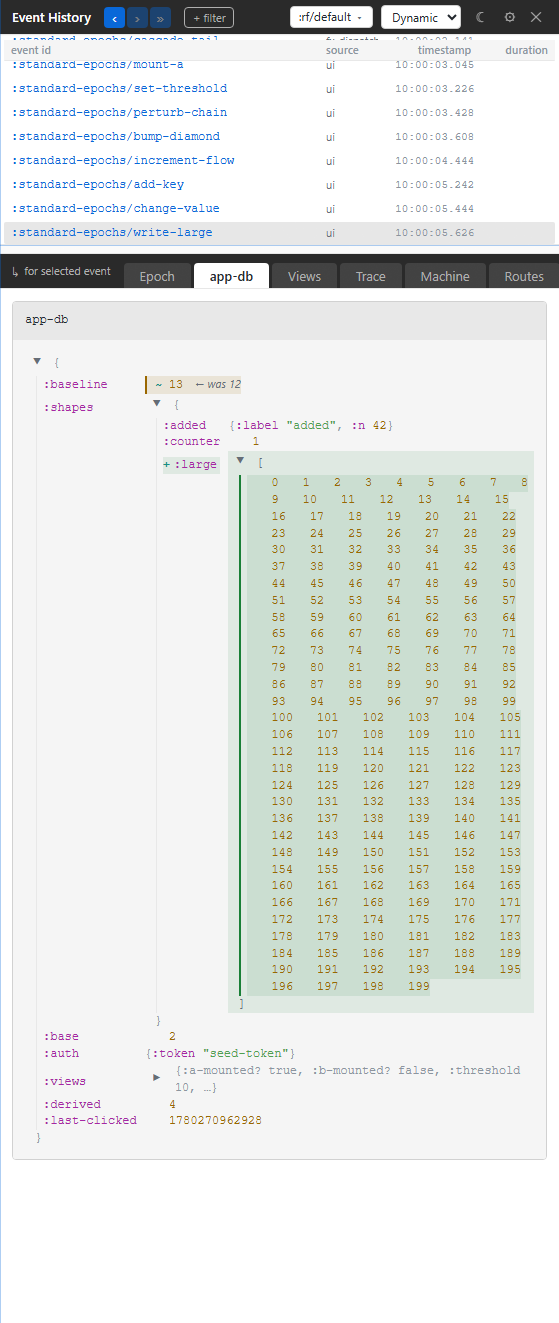
← was shows a changed value's previous value. Added and removed entries
receive their own diff treatment; a missing key is different from a key whose
value became nil or an empty collection. Maps above changes open
automatically so the changed paths are visible first.
Zoom into a path
Double-click a map or vector, or press Enter on it, to zoom into that value. The breadcrumb leads back up; Esc zooms out one level. This is useful for a large state tree where you only need one feature's slice.
If the handler returned the right value but the screen is wrong, inspect the subscription and view that consume it in Views.
App state and framework state
Your application keys are in the top app-db card (1). Flow output appears there too, at the flow's declared output path.
The framework keeps machine and routing state in a separate runtime
partition. Xray follows with cards for machine instances under :rf/machines
and :rf/spawned, then :rf/route, :rf/pending-navigation and :rf/elision
when present. These labels organize the inspector; they are not application
keys you should write with a handler.
Resource caches have their own Resources panel.
Troubleshooting
| Symptom | Cause | Action |
|---|---|---|
| The value differs from the running app | You selected an earlier epoch | Compare the selected row with the newest row |
| State looks valid after a bad write | A schema check may have rejected the candidate | Check the pink row and Epoch's violation block |
| A sensitive value is a redacted chip | The current local visibility profile redacts it | Read the path and surrounding state, or choose the appropriate local profile |
| “N redacted paths modified” without a visible diff | Both old and new values display as redacted | Use the path count as evidence of change; redaction cannot display the values |
| A long value is shortened | Its classification or the display limit elided content | Inspect a smaller path or use the application's own controlled test |
The panel is read-only. Dispatch an application event to change state, or use Reset to restore a retained snapshot.