7. Workspaces, modes, composition
You have more variants than you want to copy-paste. This chapter explains the organizational tools: workspaces for layout, mode tabs for Canvas/Docs/Tests, toolbar modes for environment pivots, and composition for shared setup. The design goal is reuse without the classic "a decorator did something somewhere" mystery.
Three things people call modes
There are two real Story concepts and one browser habit that often get mashed together in conversation.
Mode tabs are the tabs above the canvas:
- Canvas;
- Docs;
- Tests.
They change how the selected artifact is presented.
Toolbar modes are registered arg tuples:
They change the environment the artifact renders in.
Browser modes such as viewport and background are chrome selections. They
are useful for review, but they are not the same thing as reg-mode.
Keeping those drawers separate prevents a surprising amount of nonsense.
Docs mode
Docs mode renders the selected variant as executable documentation.
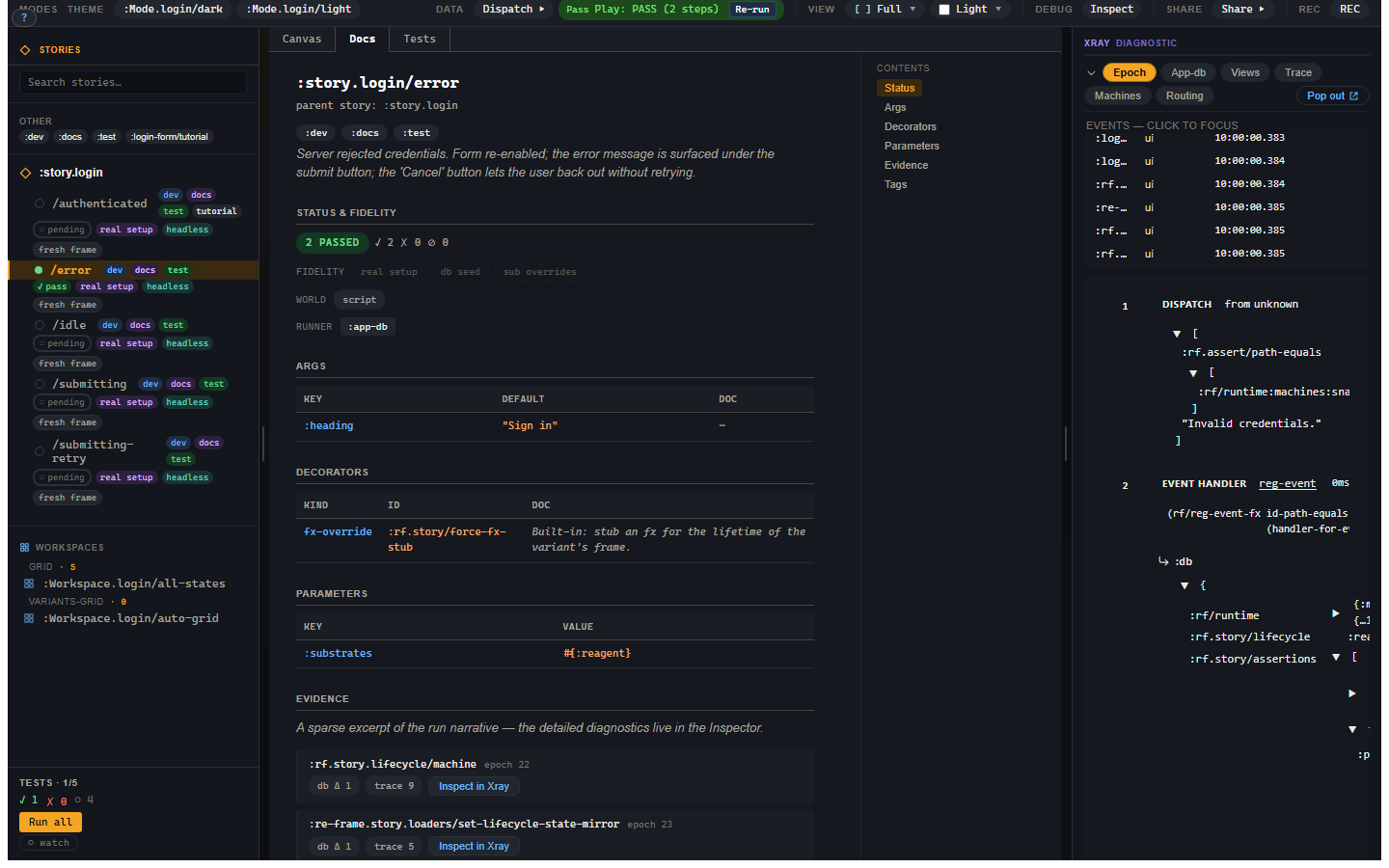
The page is built from the same registered variant:
:docbecomes prose;- tags become chips;
- args and view schemas become tables;
- decorators and parameters are listed;
- status and fidelity are visible;
- evidence excerpts appear after a run.
This is the important drift-killer: a documented state is not a Markdown example that someone has to keep in sync. It is the same state the canvas and test runner use.
Workspaces
Workspaces are layout artifacts. The common layouts are:
| Layout | Use it when |
|---|---|
:grid |
You want explicit variants in a specific order. |
:variants-grid |
You want every variant under a story parent. |
:tabs |
You want one variant visible at a time. |
:prose |
You want prose interleaved with rendered variants. |
:custom |
You have a registered view that owns the layout. |
Most projects start with :grid and :variants-grid. The more editorial
layouts become useful when a component or workflow deserves real documentation.
Toolbar modes
Toolbar modes are saved args:
(rf.story/reg-mode :Mode.app/light
  {:axis :theme
   :args {:theme :light}})

(rf.story/reg-mode :Mode.app/dark
  {:axis :theme
   :args {:theme :dark}})
Modes with the same :axis are mutually exclusive. Turning on dark turns off
light. The active mode args sit in the args precedence chain below story and
variant args:
That gives you the Storybook globals gesture without hiding it in code. A mode is just named data.
A decorator for every story
Storybook keeps project-wide wrappers such as a theme provider in preview.ts.
In Story it is one registration, made once in your stories namespace:
(rf.story/reg-global-decorator :app/theme
  {:kind :hiccup
   :wrap (fn [body _args] [:div.app-theme body])})
Every variant now renders inside :app/theme. Globals are the outermost layer,
so the stack reads global, then story, then variant, with the earliest-registered
global outermost. The difference from preview.ts is that the chain is data,
not a module: rf.story/variant-plan carries the resolved stack under
[:world :decorators], and Docs mode's Decorators table lists the global first.
Explain does not show decorators yet. Neither rf.story/explain nor the Explain
panel lists the stack, so check the plan or Docs mode when you want to know what
wraps a variant. The
registration reference covers
clear-global-decorator and the configure! form.
Extends
:extends specializes another variant:
(rf.story/reg-variant :story.login/error-after-filled-form
  {:extends :story.login/filled
   :script [[:dispatch-sync [:login/flow [:login/submit]]]]
   :assertions [[:rf.assert/state-is :login/flow :error]]})
The inheritance rule is:
context flows down, verdict is local.
That means:
| Field | Rule |
|---|---|
:setup |
parent then child, appended in order. |
| args, decorators, network, frame/world inputs | inherited with field-specific merge rules. |
:checks |
inherited. |
:script |
child-only. |
ordinary :assertions |
child-only. |
| tags | union. |
A child inherits the world the parent established. It does not silently run the parent's behaviour or inherit the parent's verdict. That rule prevents a parent variant from becoming a spooky action at a distance.
Fragments and checks
Use a fragment for reusable setup/script/world context:
(rf.story/reg-fragment :fragment.login/filled-form
  {:setup [[:login/flow
            [:login/type {:email "ada@example.com"
                          :password "correct-horse"}]]]})
Use a check for reusable expectations:
Compose them explicitly:
(rf.story/reg-variant :story.login/submits
  {:compose [:fragment.login/filled-form
             :check/no-runtime-warnings]
   :script [[:dispatch-sync [:login/flow [:login/submit]]]]
   :assertions [[:rf.assert/state-is :login/flow :authenticated]]})
Fragments are intentionally flat. A fragment does not compose another fragment. That keeps composition easy to explain and keeps cycle detection from becoming the tutorial's least charming character.
When two composed fragments conflict on a strict field such as an effect override, the variant owns the decision by stating the wanted value. The closest authoring site wins; equal-distance disagreement is an error. If that sentence feels wonderfully boring, good. Merge rules should not be exciting.
Explain is the receipt
When composition is involved, use rf.story/explain or the Explain panel. It shows
the source chain, merge decisions, setup order, script order, checks, assertion
locations, runner requirements, and source coordinates.
If a composition system cannot explain itself, it is not a composition system. It is a rumour.