Skip to content

2. Panel tour

Two chromes, thirteen tabs. You'll live in three or four of them daily, reach for the rest the occasional Tuesday afternoon when something exotic breaks.

This chapter is the map. First the two chromes — Dynamic (the event-coupled spine) and Static (the registry browser) — then a one-paragraph "when you'd open this" answer for each tab. The chapters that follow take the hero surfaces — Event detail, time-travel, Trace, Click-to-source, App-DB, Machines — and unpack them depth-first.

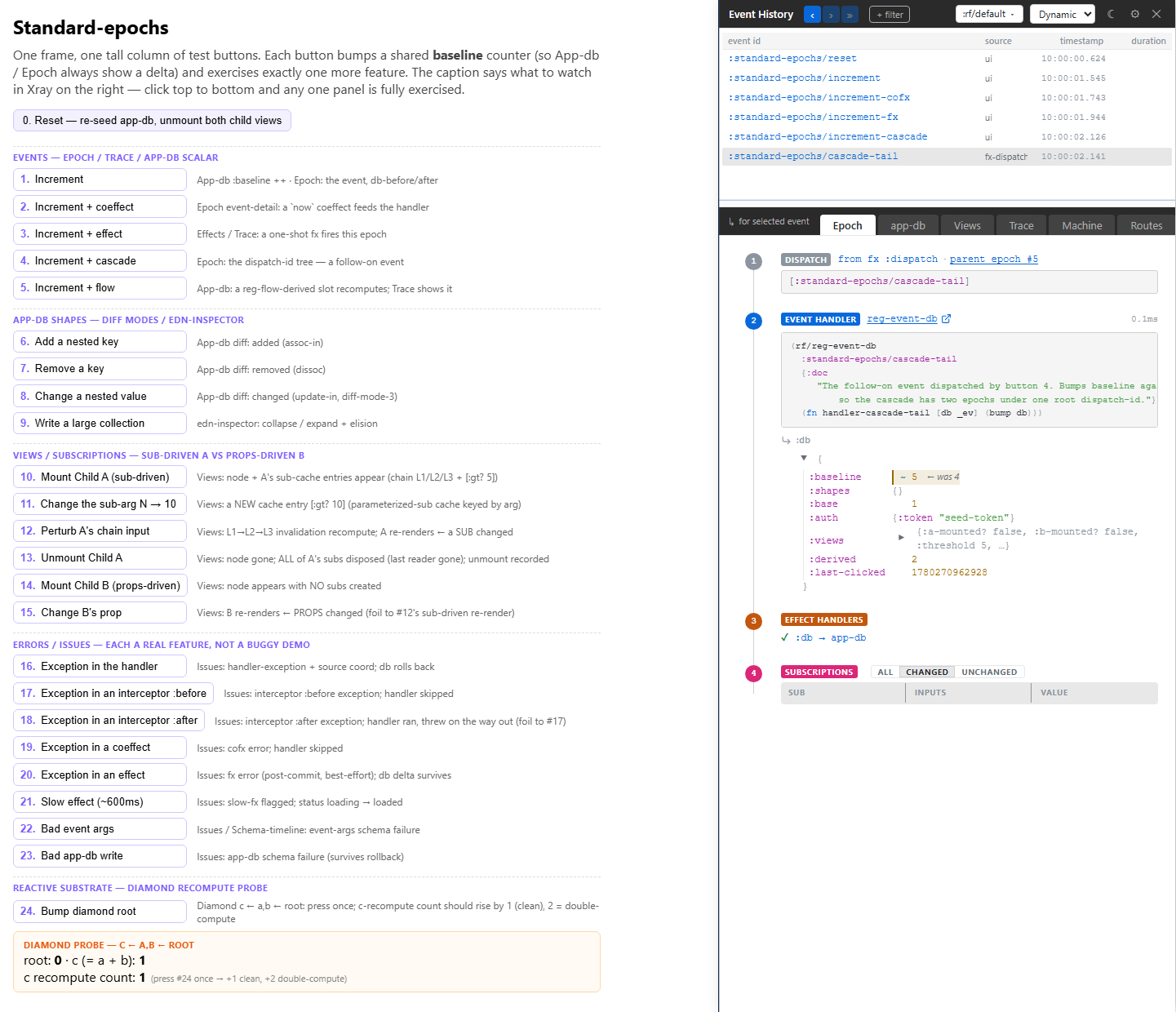
The Xray shell, opened over the live app — the four-layer Dynamic chrome

The two chromes

Xray is one tool with two reading postures, toggled with Cmd-Shift-M. The mode pill at ribbon-left says which you're in; the chrome silhouette tells you at a glance even if you don't look at the pill.

Dynamic — four stacked layers:

┌───────────────────────────────────────────────────────┐
│ L1  Top ribbon (56px)                                 │  scope controls
├───────────────────────────────────────────────────────┤
│ L2  Event list (8 rows default; resizable; min 2)     │  the spine / timeline
├───────────────────────────────────────────────────────┤
│ L3  Tab bar (40px) — 7 tabs                           │  projection selector
├───────────────────────────────────────────────────────┤
│ L4  Detail panel (fills remaining canvas)             │  per-tab content
└───────────────────────────────────────────────────────┘

Every Dynamic surface orients around one focused event — the spine sub :rf.xray/focus. You pick an event in the L2 list; every tab below rebinds atomically. The tabs are lenses on that one event.

Static — three layers (no L2 spine, because Static is event-independent):

┌───────────────────────────────────────────────────────┐
│ L1  Top ribbon — mode pill · frame picker · icons     │
├───────────────────────────────────────────────────────┤
│ L3  Tab bar (40px) — 5 tabs                           │
├───────────────────────────────────────────────────────┤
│ L4  Detail panel (fills remaining canvas)             │
└───────────────────────────────────────────────────────┘

Static reuses Dynamic's full design language — same fonts, same palette, same 56px ribbon and 40px tab-bar. The differences are deliberate signals: a cyan left-edge stripe (violet in Dynamic), a dampened motion profile (continuous pulses dropped, tab swaps instant), and the missing L2 itself. Same surface, quieter key.


Dynamic mode — the seven tabs

L1 — the ribbon

The scope band, fixed at the top in both modes. Four clusters, left to right:

  • Nav (◀ ▶ ⏭) — step focus back / forward through the spine, or to snap to the live head.
  • Frame picker — single-select over the distinct frames in the cascade list. Every tab scopes to the picked frame; the :rf/xray frame is excluded by default.
  • Filter pills — IN (green, +) and OUT (magenta, ×) pills over the event list, plus a trailing [+] to add one. Click any pill to edit it.
  • Right icons — settings and close . (Pop-out is a programmatic API, (xray/popout!) — no ribbon affordance yet.)

L2 — the event list (the spine)

Single-line rows, latest-on-bottom, eight visible by default and vertically resizable (drag the L2/L3 boundary; min two rows). Each row carries a gutter glyph (● ◉ x ▥), the event-id, a right-aligned badge cluster ( exception · 🌐 managed-HTTP · 🤖 machine activity), and a trailing redaction marker when sensitive data was suppressed.

This is the timeline. Click a row → focus it (the spine flips to RETRO) and every tab rebinds in one frame. This is also where time-travel lives — there is no bottom rail; you scrub by walking the spine. See chapter 3.

L3 / L4 — the seven tabs

Selection lives on :rf.xray/selected-tab and drives the L4 detail panel. Mnemonic letters in brackets.

Event (e) — the landing tab

Event tab showing the focused event's full six-domino story

Lands on every open and on every focus change. The whole story of one event: the event vector + arg-map + dispatch site, the coefficients and interceptor chain, the handler return, the :db writes, the :fx vector, and the fx-handlers that actually ran (with their results). If you're answering "what did this event do?", this is the tab. Effects are folded in here — the "effects handlers ran" block covers what a standalone Effects panel used to.

App DB (a) — slice-centric diff

Not a full app-db tree dump. The diff of :db-before vs :db-after for the focused event — slice-first, with clickable path segments, path-origin chips, and a full-tree disclosure when you want the whole picture. Read-only; Xray never writes to app-db for you (use re-frame2-pair for that, or dispatch a real event). See chapter 9.

View (v) — why these views rendered

Per-view rows — mounted / re-rendered / unmounted — each listing the subs it used and those subs' return values, isolation-scoped to the selected frame. Subscriptions are folded in here: they nest under each view row rather than living in a separate tab, because the question you actually have is "why did this view re-render?", and the answer is the sub-invalidation chain underneath it.

Trace (t) — the raw stream

The raw multi-axis trace stream, filtered to the focused cascade (:dispatch-id = <focus>). A trace-type toggle row sits at the top with IN/OUT pills and sensible defaults. This tab is what you'd write yourself with register-listener! if Xray didn't exist — the bus's most direct rendering. See chapter 4.

Machines (m) — event-driven state-charts

The event-driven machine lens. Blank when the focused event touched no machine. When it did, one section per affected machine: topology with the transition highlighted, the guards and actions that ran, the cancellation cascade, and :after rings. This is the "what did this event do to my machines?" view — to browse a machine's full shape cold (spine-independent topology, picker, zoom / pan / fit), flip to Static mode and open its Machines tab. See chapter 8.

Routing (r) — the focused-event route lens

A flat focused-event lens: the currently matched route with its params / query / fragment, plus a Simulate-URL input that ranks every registered route via the six-rule :rf.route/rank tuple with the rank explainer inline. Per-event glyphs (◆ HERE / ◆ FROM / ◆ TO) mark the route's role in the focused cascade. Silent when no routes are registered.

Issues (i) — the unified feed

The catch-all health feed: JS exceptions, schema violations, sensitive-data warnings, hydration mismatches, perf-budget overruns, and app console errors/warns. One row per issue, with a severity gutter (), source coord, and the underlying trace event one click away. This is where you check first when "something looks off" — and where the schema timeline and hydration debugger surface their findings.

Three diagnostics folded away, not dropped. Effects fold into Event, Subscriptions fold into View, and Performance is delegated to Chrome DevTools' Timings track — the framework emits rf:event:*, rf:sub:*, rf:fx:*, rf:render:* User-Timing entries that DevTools renders natively. No separate Xray tab competes with the browser's own profiler.


Static mode — the five tabs

Flip to Static (Cmd-Shift-M) to browse the registry cold. No spine, no focused event — these tabs answer questions about the shape of the app, not a particular cascade.

Machines (m, default)

The registered-machine browser plus topology and a sub-strip of browse modes. Lands here by default — it's the densest Static surface.

Routes (r)

The full registered-route table plus the Simulate-URL ranker. The cold counterpart to Dynamic's Routing tab: there you see the route a cascade matched; here you browse every route and test how an arbitrary URL would rank.

Schemas (c)

Every registered Malli schema — app-db slot, sub return, event payload, cofx — with sample data and jump-to-source. Lit up only if your app registers schemas; see Guide 04a — Schemas.

Flows (l)

The registered flows catalogue — re-frame2's reactive-derivation primitive. Each flow's inputs, its derivation, its current value. Only populated if your app registers any.

Interceptors (i)

A pure-browse lens over the registered interceptor chains — useful when "an interceptor is mutating something I didn't expect" and you want to read the chain cold.


Resizing Xray

Drag the left edge of the Xray panel to resize horizontally. Width persists across reloads (per-Xray-instance, stored in localStorage). Within Dynamic, drag the L2/L3 boundary handle to grow or shrink the event list; the detail panel takes the remainder.

For full-screen inspection, change Settings → General → Panel position to fullscreen. For an out-of-window view, change it to popout — the browser's window controls then govern size.

How the tabs share state

In Dynamic, every tab reads the same spine. Selecting an event in L2 pins the App DB diff to that epoch, filters Trace to that cascade, scopes View to that frame's renders, and lights up Machines / Routing / Issues with that event's activity — all in one frame. The two modes keep separate tab selections, so flipping to Static and back never clobbers where you were.

The state is one big sub-graph rooted at Xray's app-db — a separate frame (:rf/xray) from your app's. That separation is what lets Xray survive restore-epoch on the host frame: the historical view is a projection over the rewound host, not a rewound Xray.

You don't have to know any of this to use the tool. But it's how the tab composition is so cheap to extend — adding a tab is "register one slot with reg-l4-tab!, render one view"; the substrate is already there.

Next: time-travel scrubbing — walking the spine into RETRO.