Routes
Navigation went wrong: the app landed on the wrong page, a guard refused to leave, or a route param is missing. Xray has two Routes tabs. The Dynamic Routes tab shows what the focused event did to navigation. The Static Routes tab lists the registered routes and shows which route a URL would match.
The Dynamic Routes tab
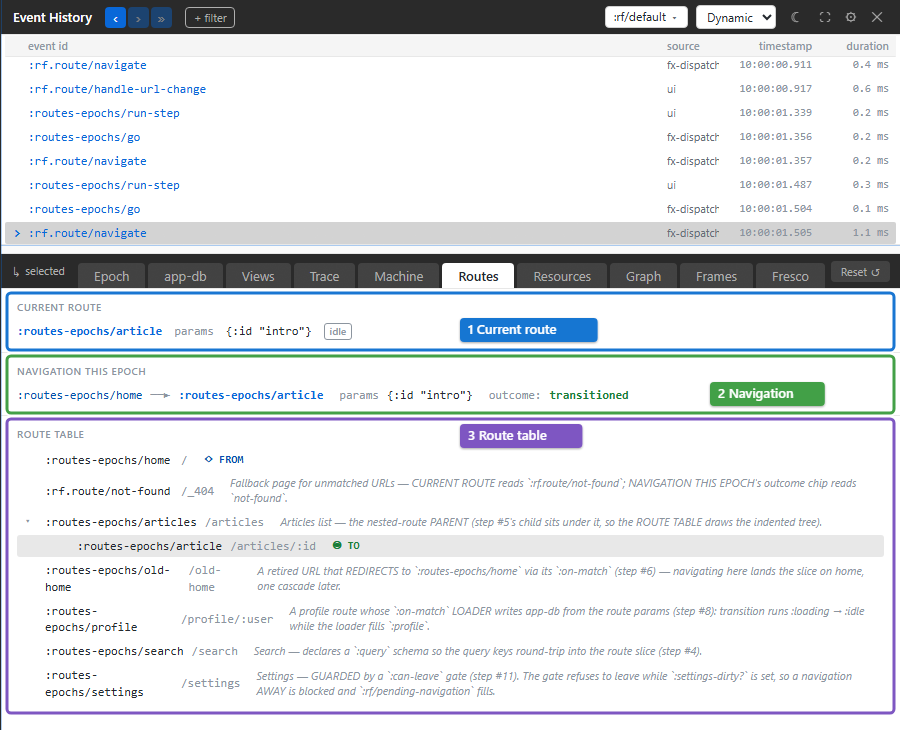
The tab has three sections, numbered in the screenshot:
- Current route is the route the frame is on now: its id, its params, the query and fragment when there are any, and a chip reading
idle,loadingorerrorfor the route's loading state. Hover anerrorchip for the error. This section shows the app's state now, not the focused event's. - Navigation this epoch shows what the focused event did to navigation: the route it left, an arrow, the route it went to, the params, and the outcome. The outcome is
transitionedfor a navigation that completed,blockedwhen a:can-leaveguard refused to leave,entry deniedwhen the target route's:can-enterguard refused,not-foundwhen no route matched, andfragment changedwhen only the URL fragment moved. - Route table lists every registered route with its path, indented under its
:parent. When the focused event navigated, ◉ TO marks the route it went to and ◇ FROM the route it left; when it did not, ◀ current marks the current route. ↻ cycle marks a route whose:parentchain loops back on itself.
Each section says when it has nothing to show: "No active route.", "No route activity in this epoch." or, for an app with no routes, "No routes registered in the host app."
Params and query values that the route declares sensitive show as :rf/redacted.
Try it
The routes-epochs testbed in this repository walks through the common navigation cases:
Open http://localhost:8032, open the Routes tab, and click the numbered steps on the left. Xray follows the newest event, which after most steps is the step's :rf.route/navigate:
- 3. route params (/articles/:id) navigates to
/articles/intro. The current route is:routes-epochs/articlewith params{:id "intro"}, and the outcome istransitioned. - 7. not-found / fallback navigates to a URL no route matches. The current route is
:rf.route/not-found, and the outcome isnot-found. - 10. enter dirty settings and then 11. try to leave show a
:can-leaveguard at work. The newest event is now:rf.route/navigation-blocked; click the:rf.route/navigaterow above it. Its outcome isblocked, and the current route stays:routes-epochs/settings.
The Static Routes tab
Switch to Static mode (Ctrl+Shift+M) and open Routes to browse the route table without any event.
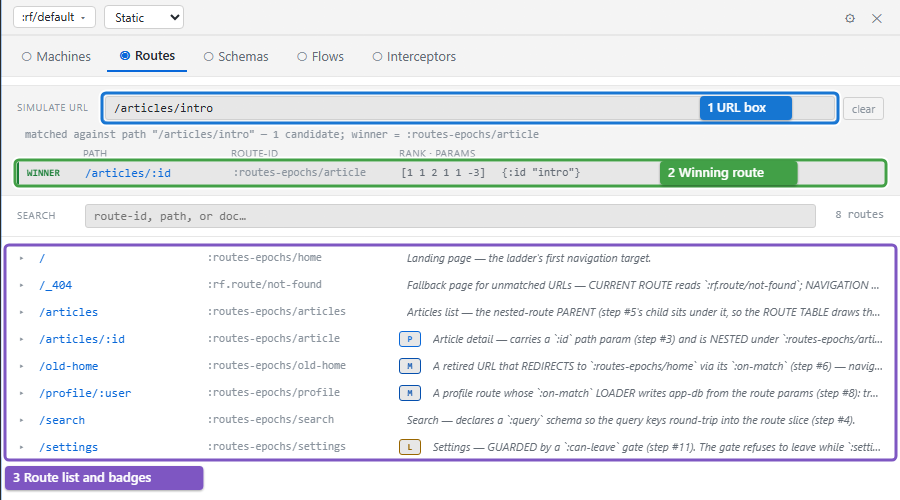
- Simulate URL matches a URL against the route table without navigating. Type a path, such as
/articles/intro; Xray ignores any origin, query or fragment. It lists every route whose pattern matches, most specific first, with the params each would receive. - The first match is marked WINNER: it is the route a real navigation to that URL would reach. Each row also shows the raw rank the router sorted by.
- Below, every route is listed by path, with Search to filter by id, path or doc string. Badges mark what a route declares: M an
:on-matchevent, L a:can-leaveguard, T tags and P a parent.
Click a route to expand it. The expansion shows its id, path, :on-match event and a source link, the keys it matches, its params and query schemas, and its registration metadata. Simulate navigation previews what the route would write into the frame's route state, and dispatches nothing. → Dynamic switches to the Dynamic Routes tab.
A routes debugging loop
When navigation goes wrong:
- Click the event that navigated, or that should have.
- Open Routes and read Navigation this epoch: where it went, and the outcome.
- If the outcome is
blockedorentry denied, open Epoch or Trace for the guard that refused. - If the wrong route matched, switch to Static mode and try the URL in Simulate URL.
To see the route state itself, open the app-db tab: the :rf/route and :rf/pending-navigation cards hold it.
Troubleshooting
| Symptom | Meaning | Action |
|---|---|---|
| Current route and an older event's destination differ | One is live state; the other is historical navigation | Read Navigation this epoch for the selected event |
| blocked | The leaving route's guard prevented navigation | Inspect :can-leave and its input state |
| entry denied | The destination's guard prevented entry | Inspect :can-enter before changing path matching |
| not-found | No route matched the requested path | Try the URL in Static Routes and compare patterns |
| A URL simulation matches but navigation still fails | Simulation checks matching, not the real transition's guard outcome | Inspect the actual navigation event |
| ↻ cycle | The parent chain loops | Correct the route registrations' :parent links |